


Microsoft’s Entra Application Proxy, or App Proxy for short, securely publishes browser-based applications from the local environment. Publishing services to the public network always involves risks, which is why publishing services through a Virtual Private Network (VPN) has become an established practice. Did you know that with modern methods, you can publish applications to work without a VPN connection?
Operating principle
The operating principle of App Proxy is simple:
- User authenticates against Entra ID
- Application request is sent to the App Proxy cloud service with Entra ID authentication
- App Proxy cloud service forwards the application request to the App Proxy Connector installed on Windows Server
- App Proxy Connector forwards the application request to the application server
- Application server processes the request and sends a response to the App Proxy Connector
- App Proxy Connector forwards the received response to the App Proxy cloud service, which delivers it to the user
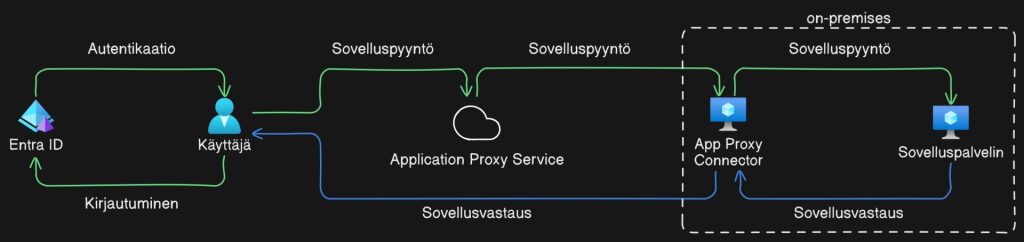
App Proxy thus enables us to publish HTTP-based applications to users without opening open connections to the server from the public network, in such a way that the user must be authenticated to Entra ID for the connection to the application server to open. Unauthenticated users therefore do not see the content produced by the application server at all before the user has successfully authenticated.
User experience and usage management
What does App Proxy look like from the user’s perspective? The user experience between native and App Proxy is almost identical. The difference with App Proxy is that it forces the user to log in with Entra ID and the application has a different URL address. The public address generated by App Proxy can be replaced by using a custom address using a CNAME record.
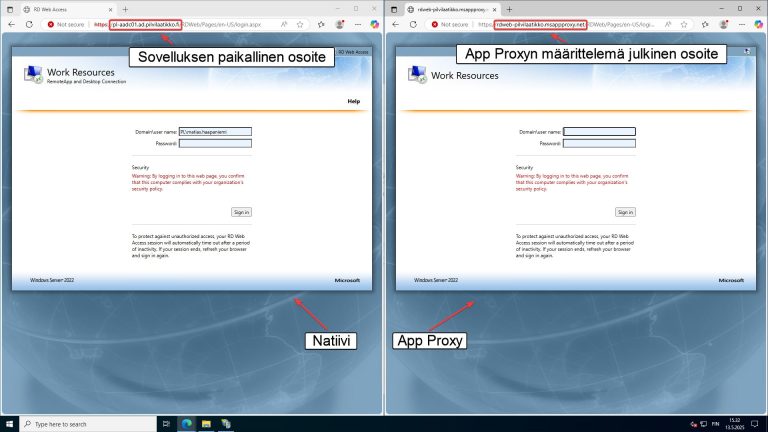
App Proxy applications become Enterprise Apps for Entra ID, meaning they have access management through Entra ID groups and users. App Proxy applications also support Conditional Access rules, meaning that logging into the application can be restricted, for example, only to devices joined to Microsoft Intune or allow login only from a specific IP address.
Implementing application protection?
Entra Application Proxy is included in a remarkably wide range of Microsoft 365 licenses. App Proxy requires an Entra ID P1 license, so for example, Business Premium, M365 E3, M365 F1, and M365 F3 entitle you to use the App Proxy feature without purchasing additional licenses.
However, App Proxy technology is not limited to publishing HTTP-based applications only. The same underlying technology works as part of
Unlike traditional App Proxy, which is designed specifically for publishing web applications, Entra Private Access enables access to all internal network applications that use TCP or UDP protocols. This means that, for example, SMB, RDP, SSH, and database connections can also be secured and published without VPN solutions or opening firewall ports to the public network.
Sometimes the easiest way to implement can be more cost-effective than you might think. Technical solutions may be implementable by utilizing existing licenses more efficiently. If you had your own ‘consigliere’, these matters might be clear to you and more quickly achievable. Our Microsoft Solution Partner status in the Security category is a sign that we are the right partner when you’re looking for real expertise to support your IT administration!


